Your employees get dozens of text messages a day. One of them, the one that looks like a delivery notice or a note from the bank, can get an attacker into your business. That is smishing, and it is growing fast.
What is smishing?
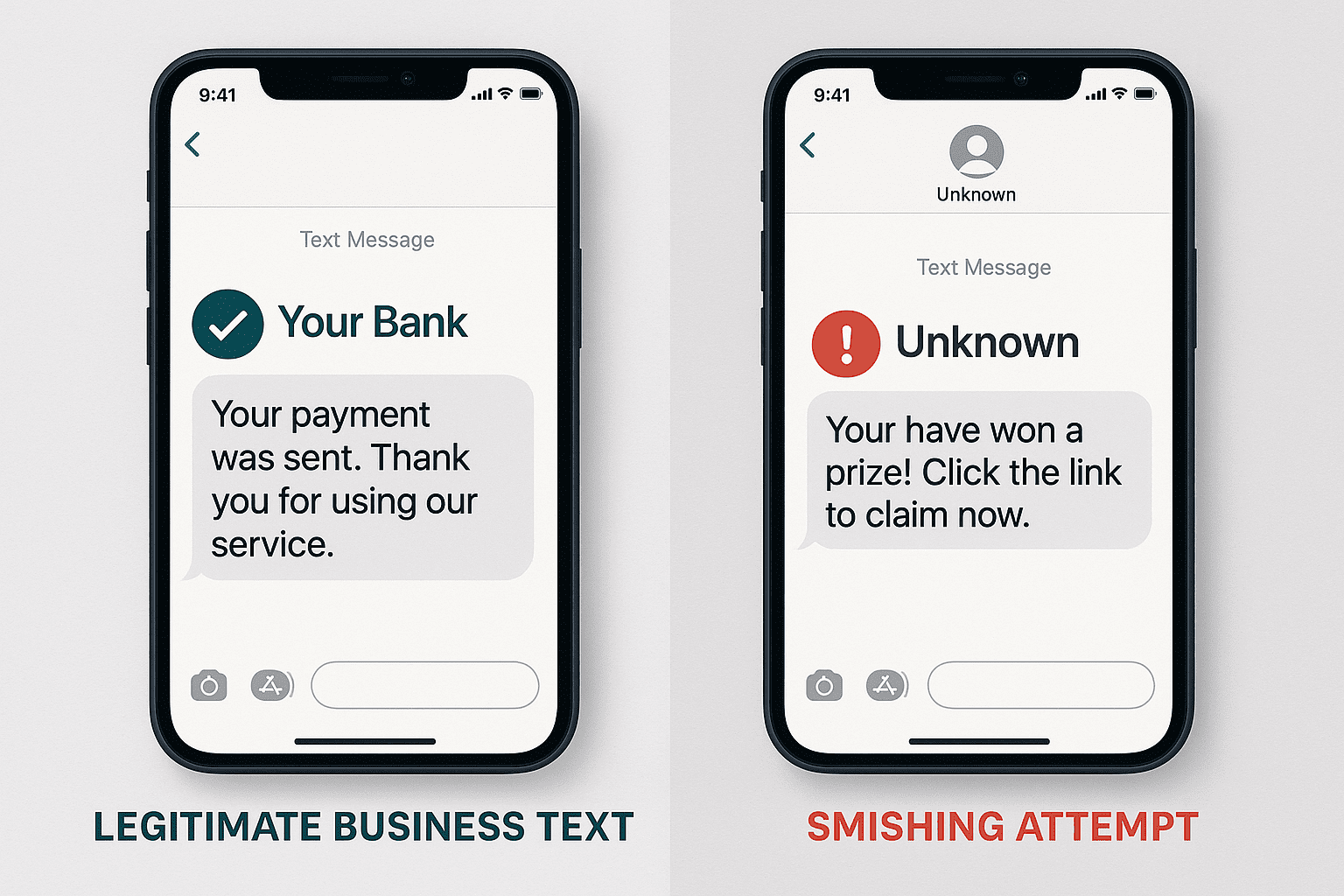
Smishing is SMS phishing. Criminals send fake text messages that look like they come from a company you trust, a bank, or a government agency. The goal is to get the recipient to give up something sensitive, like a password or a credit card number, or to tap a link that puts malware on the phone and, from there, reaches your business systems. The name is "SMS" (Short Message Service) plus "phishing."
The growing threat: by the numbers
The numbers are not comforting:
- 147 million smishing texts are sent daily to mobile users, a 20% increase from the previous year
- 45% of mobile threats are now SMS-based smishing attacks, with incidents increasing 22% in Q3 2024
- The average cost of a successful smishing attack exceeded $9.5 million per organization in 2022
- 484,500 malicious smishing attempts were reported in the US in 2023, more than any other country
Common types of smishing attacks targeting businesses
Package delivery scams: Criminals pose as a shipping company and send a fake tracking notice. The employee taps the link expecting delivery details and instead downloads malware or types their credentials into a fake login page.
Executive impersonation: The attacker pretends to be the CEO or another executive and makes the request urgent: a wire transfer, a batch of gift cards, a file that needs to be sent right now.
Bank security alerts: A fake alert from the bank asks the employee to "verify" account details on a fraudulent website. They hand over the banking credentials without realizing it.
IT department requests: Criminals impersonate your IT team and ask employees to confirm their login or install a "security update" that is malware.
How to protect your business from smishing
Put mobile device management (MDM) on company phones: MDM controls which apps can run and which links can open on a company device, which takes away most of what a smishing text is trying to do.
Train your employees: Regular cybersecurity awareness training teaches people what a smishing attempt looks like before one lands on their phone. At safemode IT, we offer free cybersecurity awareness training for exactly this reason.
Turn on multi-factor authentication (MFA): If a password does get stolen through a text, MFA still blocks the login because the attacker does not have the second factor.
Set a verification rule: Decide, in writing, how your team confirms any request that arrives by text, especially one involving money or sensitive data. A phone call back to a known number is usually enough.
If you are not sure how your team would handle a text like the ones above, that is worth finding out before an attacker does. Book a 10-minute discovery call with safemode IT and find out where your Central Texas business stands.
Not sure your IT is as solid as it should be? Take 10 minutes and tell us about your setup. No pressure, no obligation.
Book a 10-Minute Discovery Call →Frequently asked questions
What is smishing?
Smishing is phishing by text message. Criminals send fake texts that appear to come from a trusted company, a bank, or a government agency, hoping the recipient will give up a password or card number or tap a link that installs malware. The name comes from "SMS" plus "phishing."
What are the most common smishing scams aimed at businesses?
Four show up over and over. Fake package delivery notices with a malicious tracking link. Texts impersonating an executive who urgently needs a wire transfer or gift cards. Fake bank security alerts that harvest banking credentials, and messages pretending to be your IT department asking staff to confirm a login or install a "security update" that is really malware.
How do we protect our business from smishing?
Put mobile device management on company phones so malicious apps and links cannot run. Train employees to recognize the scams and turn on multi-factor authentication so a stolen password is not enough on its own. Then set a written rule for how any request that arrives by text gets verified before anyone acts on it.
Does MFA stop smishing attacks?
It stops the most damaging part. If an employee types their password into a fake page, MFA still blocks the attacker from logging in because they do not have the second factor. It does not stop an employee from being tricked into sending money, which is why a verification rule matters too.
Can safemode IT help protect our business from smishing?
Yes. We offer free cybersecurity awareness training and a free cybersecurity assessment for Central Texas businesses, and our cybersecurity services cover MFA, device management, and the rest of the layers that keep one bad text from becoming a breach.
Last updated: April 4, 2026